

Vision Board Ideas 2027 + Sample Vision Board (Free Planner)
A vision board is a collage of pictures and words that show what you want your life to look like. The best vision board ideas are specific to you, and the sample vision board below shows what that looks like. To make one that works, start with a few questions instead of a pile of magazines, pick three to six life areas, choose one picture and a few words for each, and add one small weekly action under every picture. Then put it somewhere you'll see it every day.
Below: vision board ideas for 2027 by life area, a sample vision board you can see, piece by piece, the 7 steps on paper or online, and a free planner to print before you start cutting.
A board full of beach photos and "abundance" in gold letters looks nice for a week. Then it becomes wallpaper.
The difference between a board you forget and a board you use is small: every picture has a job.
What do you put on a vision board?
Three kinds of things:
Pictures of what you want: a place, a body you feel good in, a calm kitchen table, a finished project. Your own photos work as well as magazine cuttings.
Words that sum it up in two or three words: "Strong at 40", "Debt-free", "Sunday dinners".
Actions, written small under each picture: the one thing you'll do every week that moves you toward it.
Most boards have the first two. The third is what makes you look at it differently. When you see the running photo, you also see "Run Tue / Thu / Sat". It stops being a wish and starts being a reminder.
Vision board ideas for 2027 (by life area)
Pick three to six areas. For each one, choose one picture idea and one weekly action. Change the details so they're yours.
Life area | Picture ideas | Words | Weekly action to write under it |
|---|---|---|---|
Health | Running shoes, a trail, a filled water bottle | "Strong", "Energy" | Run or walk 3 times a week |
Fitness | A weight rack, a yoga mat, a finish line | "Stronger than last year" | 2 strength sessions a week |
Food | A full vegetable basket, a home-cooked meal, a packed lunchbox | "Cook at home" | Cook 4 dinners a week |
Sleep | A made bed, a dark bedroom, a book on a nightstand | "Rested" | Phone out of the bedroom by 10:30 |
Money | A savings jar, a "paid" stamp, a front door | "Debt-free", "Saved" | Automatic transfer every payday |
Career | A desk you'd love, a certificate, a new job title | "Promoted", "Building" | Apply to 2 roles or do 3 skill sessions |
Business or side project | A laptop with your project open, a first customer, a first invoice | "Shipped" | 2 work sessions a week, same days |
Learning | Stacked books, a language app, a classroom | "Fluent", "Curious" | 10 pages a night or 15 minutes of practice |
Home | A clean counter, an organized closet, plants | "Calm home" | 15-minute reset every night |
Relationships | A dinner table with friends, two coffee cups, a group photo | "My people" | One plan with a friend every week |
Family | A family photo, a park, a board game | "Present" | Phone-free dinners |
Travel | A map, a passport, a city you want to visit | "Go" | Save a fixed amount a month for the trip |
Creativity | A sketchbook, a guitar, a camera | "Make things" | Make one small thing a week |
Mind | A quiet bench, a journal, a sunrise | "Calm", "Clear" | 5 minutes of journaling or meditation a day |
Focus | An empty desk, a closed laptop, a phone in a drawer | "Deep work" | One 60-minute focus block a day |
Adventure | A mountain, a tent, a kayak | "Try new things" | One new thing a month |
That's 16 areas and 48 picture ideas. You don't need all of them. A board with four areas you care about beats one with sixteen you don't.
How to make a vision board in 7 steps
1. Answer a few questions first
Before you find a single picture, write your answers to these:
What do I want to feel more often in 2027?
What would a good ordinary Tuesday look like a year from now?
What do I want to have finished by December?
What do I want to stop doing?
Which part of my life would I change first if I could only change one?
If those are hard to answer, the journal prompts for planning 2027 are a good warm-up. If you don't know what you want at all, start with how to figure out what you want (members).
2. Pick three to six life areas
Look at your answers and circle the areas they keep coming back to. That's your board. Fewer areas mean each picture gets more attention.
3. Find your pictures
On paper: magazines, printed photos, postcards, screenshots you print at home. Online: free photo sites, your own phone photos, or a Pinterest board you save into.
Choose pictures that feel specific to you. A photo of your favorite trail beats a stock photo of someone else's.
4. Add your words
Two or three words per area. Short and plain. "Run a half marathon" is better than a long quote, because you can read it in a second.
5. Write one weekly action under each picture
This is the step most guides skip. Under every picture, write the weekly action from the table, or your own. Small enough to do in a bad week. If an action still feels vague, run it through the formula in these SMART goals examples.
6. Put it where you'll see it every day
Next to your mirror, above your desk, inside a closet door, or as your phone lock screen. If you have to go looking for it, you won't.
7. Review it once a month
On the first of each month, look at each action and ask: did I do it most weeks? If yes, keep going. If no, make the action smaller, don't take the picture down.
Free printable: the vision board planner
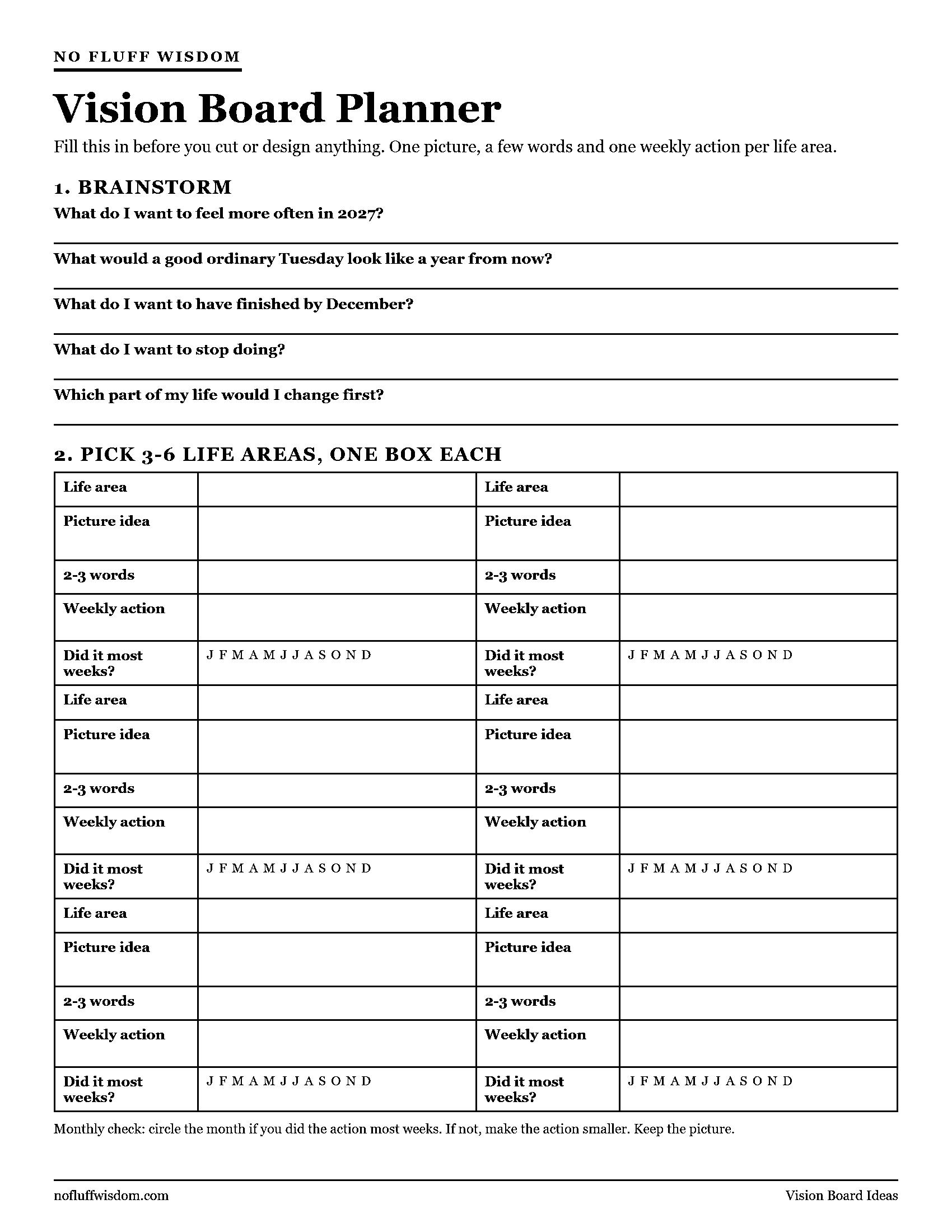
Right-click (or long-press) the image to save it, then print it on US Letter or A4 and choose "fit to page".
Fill this in before you start cutting or designing. It has space for your brainstorm answers and six boxes, one per life area. Each box asks for:
the life area
the picture idea
two or three words
the weekly action
the monthly check: did I do it most weeks?
Once the planner is done, making the board takes about an hour, because every decision is already made.
The planner covers one board. Keeping those weekly actions going after the first few weeks is the bigger job, and that's what The Execution Bundle is for: both NoFluffWisdom books together. 7 Steps to Change Your Life walks through seven habits worth building, with prompts and templates. The 90-Day Discipline Blueprint gives you 12 guided weeks, a printable 90-Day Tracker and a Restart Plan for the weeks that slip. 25% off with code 25off.
What does a sample vision board look like?
Here's a hypothetical board for one person, then each piece explained.

Top left - Health. A photo of a running trail. Words: "Strong at 40." Action: "Run Tue / Thu / Sat."
Top middle - Home. A photo of a clean, quiet kitchen table. Words: "Calm home." Action: "15-minute reset every night."
Top right - Money. A photo of a jar full of coins. Words: "Debt-free by December." Action: "Extra $100 on the card every payday."
Bottom left - Relationships. A photo of friends around a dinner table. Words: "Sunday dinners." Action: "Text one friend every Monday to plan Sunday."
Bottom right - Learning. A photo of a stack of books. Words: "24 books." Action: "10 pages before bed."
Five areas, five pictures, five actions. The board takes a single glance to read, and every picture tells this person what to do this week.
Should you make a vision board on paper or online?
Paper is better if you want something physical on the wall, and the making itself is part of the fun. You need a poster board or cork board, scissors, glue or pins, and a marker for the actions.
Online is better if you want to see it on your phone every day. Canva has free vision board templates. A Pinterest board works too, but it tends to grow forever, so pick your final images and put them on one page. Save the finished board as your lock screen or desktop background.
You can do both: make it on paper, take a photo, and set the photo as your lock screen.
Do vision boards actually work?
A vision board on its own won't change anything. Looking at a picture of a trail doesn't make you run.
What a board can do is remind you, every day, what you decided was important. That's why the actions matter. The picture keeps the goal in front of you. The action tells you what to do about it this week. If the picture stays up but the action never starts, the block is often fear, and this guide to overcoming fear of failure has a worksheet for it.
If you want the full plan behind each picture, the 2027 resolution worksheet turns one area into a weekly plan with a minimum version for bad weeks.
FAQ: vision boards
What is the main rule for a vision board?
Make it specific and keep it in sight. Specific pictures and short words, in a place you see every day. Adding one weekly action per picture makes it something you use, not just decoration.
How many pictures should a vision board have?
Enough to cover three to six life areas, usually 5 to 12 pictures. More than that and nothing stands out.
When should I make a vision board for 2027?
Any time, but late December or early January works well, because you're already thinking about the year. Making it in December means it's on the wall on January 1.
Where should I put my vision board?
Somewhere you see it daily without trying: by the mirror, above your desk, inside a closet door, or as your phone lock screen.
How often should I update my vision board?
Check the actions once a month and update the board when a goal is done or no longer matters. Most people redo it once a year.
Your board shows what you want. If you want help with the habits that get you there, both books are in one bundle. 25% off with code 25off.
In the next 10 minutes: answer the five brainstorm questions above, circle your top three life areas, and write one weekly action for each.